Avid Media Composer with Blackmagic SDI#
Avid Media Composer can send audio to multiple outputs simultaneously, such as the Blackmagic device for on-site monitors and Desktop Audio for the remote editor in Jump Desktop. With both outputs configured, an editor can work on the Avid workstation remotely and hear its audio while SDI output continues on site.
For example:
- An editor cuts on an Avid workstation from home while the SDI monitors in the edit suite continue playing.
Applies to#
- Host: the Avid workstation, Windows or macOS, running Jump Desktop Connect.
- Avid: Media Composer 2024.10 or later.
Steps#
On the Avid workstation:
- Route system audio to Jump Desktop:
- Windows: Connect streams audio from the default output device. Verify that Avid audio plays through that device.
- macOS: Connect switches the output to Jump Desktop Audio during a session. If Change Audio Device is off in Connect, set the output to Jump Desktop Audio in Sound settings.
- Play a sound and confirm that it is audible in your Jump Desktop session. If it is not, see Remote audio.
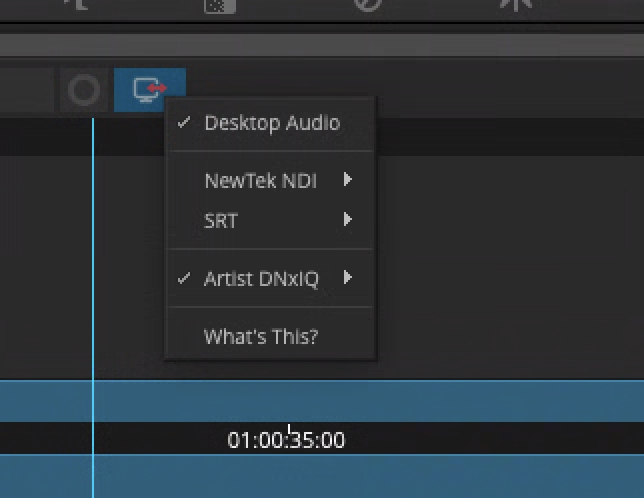
- In Avid, open the Timeline window and click the hardware icon on the timeline toolbar. The icon shows the name of your Blackmagic device.
-
Select both your Blackmagic device and Desktop Audio.
Check that it worked#
Avid audio is audible in the Jump Desktop session, and the Blackmagic device continues to output SDI video and audio.